How to Install a Printer: Dell B2360dn Mono Laser

Connecting a printer to your computer is sometimes tricky. I got a used black & white (“mono”) laser printer and my computer could not recognize it despite connecting it by the USB cord. Here’s how I finally figured it out. These steps should generally work for adding any older home printer with a USB cord to your laptop or computer, not just the Dell B2360dn Mono Laser printer.

Step 1: Turn devices on. Plug in your printer and computer and power them both on. Connect the printer to the computer by USB cable.

Step 2: Download the printer driver.
https://www.dell.com/support/home/en-us/product-support/product/dell-b2360dn/drivers

Search online for your printer brand + model + driver. That should lead you to the official printer brand’s website where you can search for your specific model, then download the corresponding driver for free.

I downloaded the driver for “Dell Printer Driver for PCL5e…” from this list because the File Name contains “signed” (UPD v3 APW Driver Package_signed – PCL5.zip).

The driver is a software that helps the computer recognize and connect to the printer hardware. These are sometimes downloaded automatically upon plugging in a printer and having internet connection. But for some older printers, these are not automatically downloaded.

Step 3: (for Windows 11) Open Windows search bar, type “printer” > choose “Printers & Scanners” or “Add a printer or scanner” > Add Device > wait a few seconds as it searches, then “Add Manually”.

The printer is not detected by the computer and does not appear on the refreshed printer list, so we will add it manually.

Step 4: Choose the last option in the new popup window, “Add a local printer…with manual settings”.

Step 5: Choose “Use an existing port:”, then select your printer from the drop down list > Next.
Troubleshooting if printer not in drop down: Make sure the printer is on and connected by USB cable to the computer.
This is how I confirmed my printer make & model name.

Step 6: Install the Printer Driver you previously downloaded.
I selected Dell on the left side, then “Have Disk”, and pointed it to the signed driver file downloaded in step 1 that ends in ‘.inf’ file extension.
This is where I read about ‘digitally signed’ drivers and thus opted for the signed option from the Dell website. I had to dig a little amongst the downloaded driver files to find the one ending in .inf. In this case it was DKUD1o40.inf.

Mission complete!
Your printer’s driver is now installed and it should show among the printers list. Happy Printing!

Fall Eggies: Aug, Sept Oct 2024

Last night (just after Thanksgiving) there was a solid frost blanketing the grass and tree branches. I broke up a top crust of ice in the hens’ water bowls. The hens are going to roost with the sunset around 4:40pm and rise at 7am, so they are sleeping well over 12 hours. These are the signs of late fall and winter.

Here is the egg count for the year thus far:

Month
(2023)
Laying
Hens
Eggs per Day (avg)Eggs per WeekDozens per WeekEggs per MonthDozens per MonthFeed CostCost per Dozen
Oct5.254.0292.412510$ 30$ 2.85
Sep64.6332.813711$ 30$ 2.60
Aug75.6413.417515$ 30$ 2.04
July75.8423.517915$ 30$ 1.99
June76.2453.718615$ 30$ 1.92
May7.256.2453.719216$ 30$ 1.86
April7.255.8423.517314$ 30$ 2.06
March7.54.5322.713812$ 30$ 2.58
Feb53.8282.31079$ 30$ 3.33
Jan3.52.7191.6837$ 30$ 4.30

The “Laying Hens” count is now corrected, which I forgot to do in previous posts. 3 hens have been molting this fall: Waffles, Shaki and Tots. I’m surprised Tots is molting at just one year old, which I realized when she became unusually skittish to the touch and started losing head and tail feathers. The partial hen counts mean that a hen stopped laying (started molting or Nuggo’s henopause) for part of a month.

There is a noticeable decline in egg laying. I now sometimes buy eggs to supplement. I always thought that my hens’ eggs were on the smaller-side compared to large supermarket eggs, but pleasantly found ours to be as big or bigger than large eggs by weight.

I am also perplexed why the 2 year old hens (Brownie, Blanqui, Ramsey) haven’t noticeably molted nor paused laying eggs. Are some barnyard mixes or hybrid varieties capable of not molting?

It’s reassuring that even though our winter egg count is low, the cost per dozen still beats the price of organic-fed, cage-free eggs at Costco or supermarkets. I believe our hens live out better qualities of life than those from best eggs at a premium grocer because their beaks are never trimmed, they can forage bugs (so many worms in the rainy season!), enjoy organic garden veggies, fruits, and grass, and have a large area per bird to roam around. The most comparable brand I have encountered so far are Wilcox Farms pasture-raised eggs (by taste) and Vital Farms Organic Pasture Raised Eggs, but my babies’ eggs have the plus that they don’t require any trucking or logistical delivery to our kitchen.

I want to raise chickens forever!
– Korean Chicken Tender

NumPy vs pandas: .nanquantile(), axis = None

I love Python, particularly pandas’ rich library for data wrangling and mathematical functions.

But today I encountered a limitation of pandas. And it’s predecessor NumPy came through.

I wanted to calculate the average, median, and count of non-null values in a dataset. My dataset is messy and I need to calculate over different columns that aren’t adjacent to each other. For example, I want the average, median and count of all the values in columns 16 and 20. Not 16 through 20. Not the average of column 16, and the average of 20. One single average for the values in both columns 16 and 20.

This is where the “axis” parameter comes in. It usually defaults to axis = 1, ie df.mean(axis = 1), to indicate we are performing the calculation over a single column. For pd.mean(), I used axis = None to get a single mean over two non-adjacent columns. (double-checked it in Excel!)

import pandas as pd
import numpy as np

# df is the dataframe of my full dataset. Here we'll work with a subset of two columns, rows 4 through 54.
hello = df.iloc[4:55, [16, 20]]

# Get mean of the two columns using pandas.mean
calc1 = hello.mean(axis=None)

But pandas doesn’t have an axis = None option for it’s functions to get the median or counts. It only has axis = 0 (over the row) or axis = 1 (over the column) as options, which is inconsistent with the .mean() option.

So this doesn’t work:

calc2 = hello.quantile(0.5, axis=None)
>>> ValueError: No axis named None for object type DataFrame

But hello NumPy! You do have axis=None available for these functions! So let’s import numpy.
My dataset has more than half of NaNs (null values) which I didn’t want to include for the median calculation. So I used np.nanquantile() in order not to count them. The np.quantile() function does count them and was returning a median value of ‘NaN’, which wasn’t what I wanted.

For the count function, we are getting a little creative by first counting all of the non-null values in the hello df (using pd.count()), then summing them up so that we can count across all multiple columns.

calc2 = np.nanquantile(hello, 0.5, axis=None) #numpy quantile allows axis of None
calc3 = np.sum(hello.count())

Thank you NumPy for saving the day! Although pandas is built on NumPy, I’m glad the libraries’ distinct features are all still accessible and that NumPy hasn’t deprecated.

I love Python! And now I love NumPy!

How to Import Tables with DataGrip

This is part 2 in continuation from the post Your Personal Database.

Now that we have a personal SQL database set up in DataGrip, let’s import our first data table. Note that this is for a personal database set up on a local computer. Not a shared database connected to an online server (which is what most companies or organizations would use).

Here’s how to import a table:

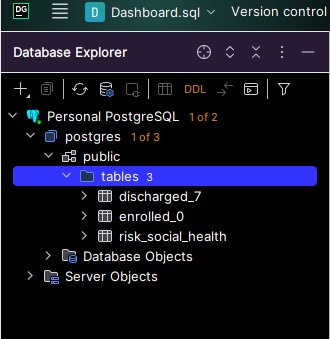
Step 1: Find the “public > tables” folder to which tables will get saved.
Starting with a fresh PostgreSQL database set up, this was located in postgres > public > tables.
If you do not see a “tables” folder, then use “public”. The tables folder will get automatically created upon importing your first table.
Do not use “Database Objects” or “Server Objects”.

Step 2: Right click on “public” or “public > tables” folder > Import/Export > Import Data from File(s).

Step 3: Select the data file to be imported as a table, then ‘OK’.
Make sure the file is closed. For example, do not have the .xlsx or .csv open in Excel on your computer, or else you will get an error.
Note how many rows of data the original file has (will use for validation in step 5).

Step 4: Set import format settings and set up SQL table.
Select the file format (top left corner).
Check “First row is header” if it applies (this is not checked by default).Z
Set the SQL table name (top right).
Review the header names (middle right). Double click on each and rename column names to lowercase with underscores replacing spaces in order to avoid using quotes ” to reference column names in SQL queries. You don’t need to redo this step when importing new data into this table in the future (but you can go back and edit).
Click “Import”.


Step 5: Validate that all data rows were imported.
A popup will appears in the bottom right corner showing how many rows were imported, and if any, how many errors were written.
Check #1: The number of rows imported should match what you expect from the original data file. For example, my data has 64 rows in the original CSV – (1) header row, and (63) data rows. So I expect 63 rows to be imported to the table.
If there were any errors, they were not imported into the data table. Investigate, fix, and re-import.

Step 6: Verify that the data looks right.
The newly imported table now appears under the “tables” folder on the top left corner.
Double click on this to view the table within DataGrip. Check that the data looks correct and as you expect.
Issues might include:
– Dates are blank or missing values (check that they have the right data type in Step 4, ie Date or Text)
– Too many rows: Old data on the table was not deleted, and newly imported data was appended on instead of replacing the old data

Step 7: Test it out!
See if it works!

SELECT * FROM new_table;

Happy SQL querying!

June & July Egg Eggies – Heat, harmony, & 6 a day!

It’s mid-August and the first heat wave has struck Seattle this summer. The highs are near 90 degrees and my back porch thermometer reported 96 degrees due to a greenhouse effect from the semi-transparent porch roof.

When it’s hot like this, with highs above 80 degrees, I check outside every hour or two to observe how the chickens are coping. They hold their wings apart from their body, pant, hang out in the shade in the north side of the house, eat less grain, and need their water bowls refilled twice dailyi. I give them kale and outer cabbage leaves in the evenings because their appetite for salad spikes. The older hens (las reinas) tolerate the heat best, while the youngest ones (las angelitas) pant and show signs of distress the most. Each year they learn to cope better.

I am grateful for these hens and the bounty of eggs they lay for us. Here’s the egg count for June, July and other months thus far:

Month
(2023)
Laying
Hens
Eggs per Day (avg)Eggs per WeekDozens per WeekEggs per MonthDozens per MonthFeed CostCost per Dozen
July85.8423.517915$ 30$ 1.99
June86.2453.718615$ 30$ 1.92
May86.2453.719216$ 30$ 1.86
April85.8423.517314$ 30$ 2.06
March64.5322.713812$ 30$ 2.58
Feb63.8282.31079$ 30$ 3.33
Jan62.7191.6837$ 30$ 4.30

Observations:

  • May was the peak of egg productivity with 192 eggs that month, costing $1.86 a dozen (organic, pasture-raised).
  • June is close behind with 186 eggs at $1.92 a dozen. It’s downhill from here due to the shortening daylight!
  • Longer daylight and sunny days induce egg laying, not warm temperatures.
  • Now, in early August, the sun rises about 2 minutes later and sets about 2 minutes earlier each day. I expect greater decreases in eggs for the remainder of the year.
  • Brownie and the two youngest hens (Misty and Tots) are finally living in harmony! After many months of Brownie spontaneously puffing up her feathers and terrorizing las angelitas, they now share moments of dust bathing and pecking at grass seeds within a few feet of each other. It’s wonderful to see your children getting along after months of bullying and fighting. Brownie was the lowest on the pecking order (Rank # 6), so I suspect she wants to make it clear to the newcomers she will not be outranked.
  • Tots glucks in fear every time Brownie gets near, which instigates anger and a peck attack. She has been getting better about staying calm and not becoming an easy target.
  • Tots and Misty still appear to be in equal rank, but occasionally they challenge each other and puff out their hackles (collar feathers).
  • Hens abhor equality, so Tots and Misty will likely have a fight and set their positions for Number 7 and 8 in the pecking order — they cannot both stay tied for 7th. It’s only a matter of time.
In harmony~

April & May Eggs – $2 a dozen!

The days are getting long now as we near summer solstice. There’s still light in the sky at 9pm! The hens rise around 5am and go to roost around 8:45pm. It intrigues me how they are used to such variable sleep over the year, because in the winter they rise around 7am and roost at 5pm (over 12 hours of sleep!) vs around 8 hours in the summer. This post’s photo features the 2 new layers, Tots (golden cheeks) and Misty (grey).

Here is Korean Chicken Tender’s April and May egg counts!

Month (2023)Laying HensEggs per Day (avg)Eggs per WeekDozens per WeekEggs per MonthDozens per MonthFeed CostCost per Dozen
May86.2453.719216$ 30$ 1.86
April85.8423.517314$ 30$ 2.06
March64.5322.713812$ 30$ 2.58
Feb63.8282.31079$ 30$ 3.33
Jan62.7191.6837$ 30$ 4.30

The cost per dozen has gone down because there are 2 new laying hens, all hens are laying almost daily, elder Nuggo occasionally left henopause, and we’ve been able to stretch a bag of organic feed for longer thanks to a Treadle Feeder.

I have been very satisfied our RentACoop Treadle Feeder which has saved me lots of time and feed. My feed costs continue to be the same going from 6 to 8 layer hens because wild birds don’t eat from the feeder. I refill the feeder about once a week now. It’s more frequent in the longer summer days because the hens are awake and active for more hours. Back in February, it was once every 2-3 weeks. One feeder is sufficient for all 8 hens, and this is much more convenient than the conventional feeder I used to refill every 2 days. The feeders are expensive but very much worth it. After patient searching, I found a new open box feeder on Marketplace for about $80 instead of the retail $145.

Thank you dear hens for providing delicious, nutritious organic pasture-raised eggs for under $2 a dozen! Me and my husband do eat all these eggs. They have become a staple in our diet!

The “Science” of Data Science

As I was trimming lavender and oregano bushes, it occurred to me that I have been intimidated by the field of Data Science because of the word “Science”. What makes Data Science a Science?

In a similar vein, what about “computer science”, “materials science”, “research science”?
Is the adoption of the word “science” a far stretch, or is there a thoughtful reason behind this?

In general the field of computer programming languages and data science follows logical thinking and deliberate nomenclature. I don’t know what qualifies as a science (perhaps following a logical procedure such as the scientific method?) but I will find out.

After attending the PyData conference last week I feel much less intimidated by terms like data science, machine learning, data structures, algorithms. In fact, I am hungry to learn more.

March Egg Count

It’s time for Korean Chicken Tender’s March 2023 egg count!

The daylight has gotten longer and there’s been an uptick in egg laying. My number 1 ranked hen, Nuggo, emerged from her summer-fall-winter-long henopause and started laying her trademark asymmetrical, lopsided eggs. This heavyset alpha female’s eggs are a treat with their rich yolks and fragile cream-colored shells.


Same as in my last egg count, I currently raise 6 layer hens. They eat organic feed and garden greens, range freely on pasture, and slurp up tasty slugs seeking solace from the spring rains.

Here’s our monthly Egg Count thus far for 2023:

Month (2023)Laying HensEggs per Day (avg)Eggs per WeekDozens per WeekEggs per MonthDozens per MonthFeed CostCost per Dozen
Jan62.719.41.6836.9$ 30.00$ 4.30
Feb63.827.72.31078.9$ 30.00$ 3.33
Mar64.532.22.713811.5$ 30.00$ 2.58

Observations:

– The cost per dozen of our organic, pasture-raised eggs dropped from over $4 in Jan to $3 in Feb to now $2.58 in March!
– Hubba hubba Nuggo resumed laying, which increased the egg count.
– When I didn’t see Nuggo roaming around with the other hens one morning, I thought she had died standing erect on her roost bar. (When the time comes, I believe she will die no less a noble death). I was shocked to discover her in a nest box. That day she did a full egg laying simulation with no actual egg. The egg appeared a few days later.

Bottom left is Nuggo’s cream-white egg – note the calcium deposit, pointed tip, and lopsided-ness compared to the other eggs. It is nonetheless a treat to eat!

Your Personal Database (PostgreSQL)

I was reading Choose FI: Your Blueprint to Financial Independence and one of the chapters concluded with a question like:
“What would you do if you didn’t have to work?”

Something rose to the surface. Even if I didn’t need to work to earn money, I would still practice data analysis using SQL.

This awakened my desire to set up a SQL server-database for personal use. Back-end database access where I can write queries. I miss this dearly from my previous job, where I had an in-house electronic record system and superuser access. I’ve tasted the forbidden fruit and cannot go back to measly front-end, web-browser button clicking to configure reports with limited functionality and flexibility. The power of back-end querying is what I seek, but this is challenging when my company doesn’t currently have a database. Setting one up is notoriously hard, even for professional developers.

I emerged through some struggles to set up a personal SQL database so I can practice queries with my own data. I like the IDE called Datagrip by Jetbrains (free with a student email address) and PostgreSQL (also free) which is what I used in the previous job. Here’s how to set it up.

Step 1: Download PostgreSQL
It’s free.
https://www.postgresql.org/download/

Step 2: Install PostgreSQL and set up postgres User Password and Port.

The super user credential will be used to set up the database connection in the IDE.
Username is postgres (by default). You define the Password.

The default port of 5432 worked for me and should work for most people.

Step 3: Complete PostgreSQL Installation. Restart computer to apply downloaded updates.

Step 4: Download and set up DataGrip.
It’s free with a student email account. There are other free IDEs such as DBeaver too.
https://www.jetbrains.com/help/datagrip/postgresql.html

Step 5: Set up the database in DataGrip.
In the “Database” pane on top left, click the + icon > new Data Source > PostgreSQL.

Give it a name. I called it Personal Postgres.

Use localhost, port 5432, and Authentication type as User & Password.
Enter the User: Postgres and the Password you defined in step 2. Choose your Save password preference (Forever is convenient for a personal computer).

Test the connection. If it works, then hit Apply and OK.

Note: If you get an error message like this, that means the PostgreSQL was not installed correctly (step 2).
You MUST use the username and password. The “No Auth” feature did not work for me.

Step 6: Savor the connection!
The database will take a few minutes to connect to an online server so that you can use PostgreSQL SQL functions. If you have very strict firewall settings on your computer, you might need to allow Windows firewall or similar to allow the 5432 port connection.

If everything is good, you’ll get a small Connected status update on the bottom right Event Log:


In a future post, I’ll share how to upload your first database table from a CSV file.

Happy querying!

Jan & Feb Egg Count

As a Chicken Tender, I raise some of the happiest chickens on the planet.
And as an analytical data tender, I like to track how many eggs have been laid and by whom.

People ask me how many eggs I collect in a week, and I’m a nut about calculating costs too. So I will share monthly updates on how many eggs were gathered and the average cost per dozen. Figuring out these numbers is satisfying. It’ll be interesting to see how the egg count and cost per dozen changes as we approach June where the longer daylight results in more egg laying, and then tapers down as we approach winter solstice.

I currently raise 6 layer hens. They eat organic chicken feed and garden greens, range freely, and slurp up tasty worms like noodles.

Here’s our monthly Egg Count for January and February 2023:

Month (2023)Laying HensEggs per Day (avg)Eggs per WeekDozens per WeekEggs per MonthDozens per MonthFeed CostCost per Dozen
Jan62.719.41.6836.9$ 30.00$ 4.30
Feb63.827.72.31078.9$ 30.00$ 3.33

Observations:

– Two of the reinas (2+ year old hens) resumed laying when they finished their winter molt (feather shedding and regrowth) in late Jan and early Feb. This increased the Feb egg count.
– The three bebitas (1 year old hens) laid daily last summer, but this tapered down to a rate of 0.8 per hen (or 4 eggs every 5 days) in January. This is to be expected due to short daylight.